






“yes, and don’t ask again”: Claude Code saved the password, GitHub got a copy, and a bot closed the bug report
the AI coding pitch goes like this: let the agent handle the tedious stuff, including security. meanwhile the agent’s own convenience button writes your database password into a JSON file in your project, researchers found more than a thousand of those files sitting in public GitHub repos, and the bug report that described the problem in August 2025 was closed in January by a GitHub Actions bot for inactivity. the future of secure software development, brought to you by a stale-issue workflow.
.claude/settings.local.json. Apiiro published research on November 6, 2026 saying 1,122 public GitHub copies of that file hold at least one secret. the numbers below are Apiiro’s, as reported by The Hacker News on November 7. we read the GitHub issue history ourselves. Apiiro did not test whether the secrets still work, and says it does not know whether anyone has used them.how a password ends up in a settings file
per Anthropic’s settings documentation: when Claude asks permission to run a Bash command and you choose “Yes, and don’t ask again,” Claude Code saves that approval as an allow rule in .claude/settings.local.json at the repository root. matching commands then run without asking in later sessions.
the rule is whatever the prompt offered. sometimes that is a pattern, like npm test *. sometimes it is the exact command. and if the exact command had a password in it, say a psql connection string, a PGPASSWORD= prefix, or sshpass -p, the password is now a permission rule. in plain text. in your project folder.
nobody wrote “store credentials in a dotfile” in a design doc. it is just what happens when you persist a string without asking what the string contains.
the part where Anthropic did try
fairness, briefly. the same docs say that the first time Claude Code writes this file in a git repository that does not already ignore it, it adds **/.claude/settings.local.json to your global git excludes file. so on that machine, for that user, git ignores the file everywhere. if you create the file by hand, the docs tell you to add it to .gitignore yourself.
the problem is the word global. per Apiiro via The Hacker News, that protection lives in one user’s git settings on one computer. it does not follow the repository to a teammate, a container, a CI runner, or a fresh laptop. it does nothing for a file that was already committed. Claude Code never adds the file to the project’s own .gitignore. and in 539 of the 1,105 repositories Apiiro traced, a commit listing Claude as co-author changed the file. Apiiro reads that as Claude often committing the file itself. the guardrail and the thing driving through it share a brand.
the numbers (Apiiro, via The Hacker News)
- 104,185 copies of
.claude/settings.local.jsonon public GitHub, across 103,617 repositories. - 1,122 of them, about 1.1%, hold at least one secret. 1,379 distinct secrets between them.
- more than a third open a database directly, including 379 database passwords. also 43 SSH logins for public servers, 42 GitHub, GitLab, and npm tokens, and 23 AWS keys.
- 63 organizations among the owners, mostly software companies. Apiiro cites a database vendor’s own admin-level cloud key and the owner password of a medical-records database among the strongest cases.
- as of the date Apiiro last checked, every file with a secret was still on its default branch, and in half of those repos it had been there at least 217 days.
- older versions of the file hold 734 more secrets across 509 repos that no longer appear in any current copy. deleting the file did not delete the secret. git does not forget. git is the elephant of version control.
- 211 forks of 74 repos carry the same secrets.
- including the shared
.claude/settings.json, older versions, and saved agent chat logs: 2,539 secrets across 1,994 repos. - of 16 coding agents whose docs Apiiro compared, Claude Code was the only one confirmed to save the full approved command in a project file by default.
- one notified company confirmed its key had been live.
Apiiro also ran gitleaks and TruffleHog over every copy, without their verification step. gitleaks flagged 564 of the 1,122 files, TruffleHog 643, and neither flagged 215. most of the misses were passwords typed inside commands, which look like ordinary words to a scanner hunting for key formats. so your secret scanning “coverage” has a hole shaped exactly like this bug.
the hypocrisy section, as promised
here is the bug report trail, which we pulled from GitHub directly:
- issue #5544 in
anthropics/claude-code, titled “[BUG] approved bash commands containing credentials are stored as is with plain text credentials in settings.local.json,” opened August 11, 2025. it describes this exact behavior. it was closed as not planned on January 3, 2026, bygithub-actions[bot]. - issue #91270, about the VS Code extension writing “always allow” grants to the tracked, shared
.claude/settings.jsoninstead of the ignored local file, opened September 1, 2026. closed as not planned on November 5, 2026, by the same bot, with a comment saying it was closing the issue for now because it had been “inactive for too long.” three days later a user commented that it had been closed by the bot without a review. - per The Hacker News, the four related reports Apiiro cites were all closed by that bot, and none got a reply from Anthropic, the researchers say. we verified the two above. we have not independently verified the “no reply” claim for all four, so it stays attributed.
let us be clear about what this is and is not. it is not a secret backdoor. it is not malice. it is a product that ships a credential-persistence behavior, documents half the mitigation, and runs an issue tracker where a security report can be quietly closed by automation if nobody on staff happens to look at it in 60 days. the industry’s answer to “who reviews the security bug” is increasingly “a cron job,” and the industry’s answer to “who reviews the code” is increasingly “the same agent that wrote the password into the settings file.” pick one thing to automate. not both.
and the crowd that will tell you AI agents are going to secure the software supply chain should explain why this one needed a third-party AppSec vendor and a press cycle before anyone noticed what was in the dotfile.
attackers already read the news
SANS ISC’s Monday Stormcast for November 9 reports that ISC web honeypots saw new requests for the .claude directory over the weekend. scanners do not need GitHub search when they can just ask your web server for the folder. if you ever deployed a project directory to a web root, check it.
what to do, in the order that matters
- rotate first. every password, token, and key that ever appeared in
.claude/settings.local.jsonor.claude/settings.json, in any branch, in any commit. then clean up. cleaning up first and rotating later is how you end up with a tidy repo and a compromised database. - search history, not just the tree.
git log --all -- .claude/settings.local.jsonper repo, and code search across your org for the path. - untrack and ignore in the repo itself.
git rm --cached .claude/settings.local.jsonand add it to the repository’s own.gitignore. global excludes do not travel with clones. - open your local file even if it was never committed, and delete any rule containing a secret. it can still leak through npm packages, Docker images, zip archives, and synced folders, per Apiiro.
- keep secrets out of commands. reference them as environment variables from a secrets manager, so the saved rule contains
$DB_URLand not the password. approve patterns likeBash(npm run:*)instead of single commands. - add a custom scanner rule for these paths and for passwords inside command strings. your default scanners missed roughly one in five of these files, per Apiiro’s test.
- treat agent folders like
.env..claude/,.cursor/,.gemini/, and friends. Apiiro recommends exactly this, and it is the right call.
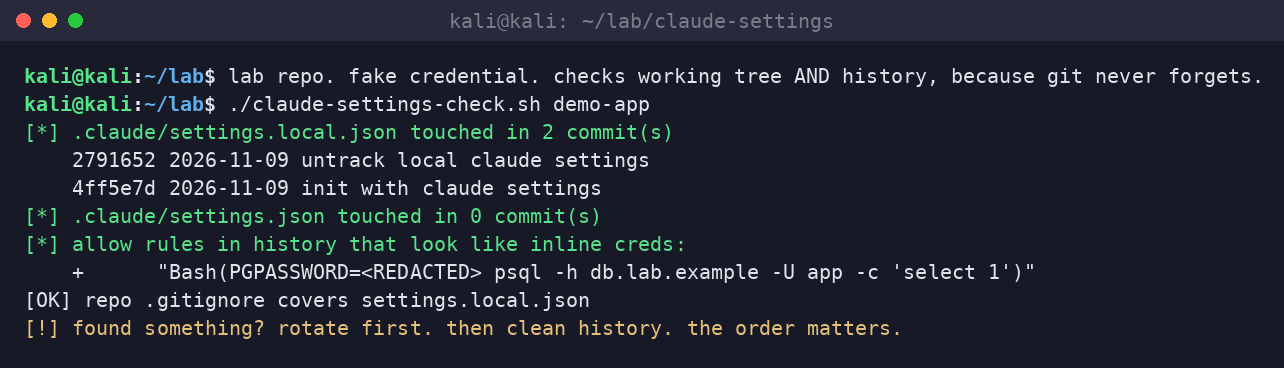
we ran a quick lab check against a throwaway repo with a fake credential, just to show what “it is in the history” looks like when the file is already untracked and ignored:
if your developers adopted coding agents faster than your secrets policy adapted, a review of agent folders, history, and scanner coverage is a cheap afternoon compared to a database restore. Book a slot with Dark Edge Consulting.
sources
- Anthropic, Claude Code docs, “Settings files and precedence” (page modified November 4, 2026)
- Apiiro, research write-up on coding agents leaking secrets through “don’t ask again” (November 6, 2026)
- The Hacker News, “Claude Code’s ‘Don’t Ask Again’ File Exposes Passwords and Keys in 1,122 Public Copies on GitHub” (Swati Khandelwal, November 7, 2026)
- GitHub, anthropics/claude-code issue #5544 (opened August 11, 2025; closed not planned January 3, 2026 by github-actions[bot]) and issue #91270 (opened September 1, 2026; closed not planned November 5, 2026 by github-actions[bot])
- SANS ISC, Stormcast for Monday, November 9, 2026