
Hunting Turla’s Cereal on Exchange: the backdoor does not call home because your mail server is home
ESET published research today on Cereal, a Turla toolset that lives on Microsoft Exchange servers, takes orders through URLs that look like Outlook traffic, and copies interesting email out of the transport pipeline without registering anything Exchange would show you. there is no external command and control server. ESET looked. the victim’s Exchange box is the command and control server. this is a lab walkthrough for finding it with what you already have.
HttpListener on prefixes such as https://*:443/owa/sdds/ and /autodiscover/proxyservice/. the mail-theft module, CerealBox, is injected into EdgeTransport.exe and hijacks existing transport agents in memory. the loader was planted as ncobjapi.dll or wbemcomn.dll in C:\Windows\System32\wbem\ and as fake native images in the .NET native image cache. ESET could not determine initial access. hunt three places: HTTP.sys URL registrations, file hashes, and EdgeTransport memory.who, where, and what they wanted
from ESET’s “Exchange for breakfast: Turla’s Cereal tricks are not for kids” by Matías Porolli, published November 10, 2026, and the accompanying white paper:
- attribution: Turla, the Russia-aligned group ESET describes as “widely assessed to be part of Russia’s Federal Security Service (FSB),” with high confidence, based on concurrent use of another Turla-linked component and similarities to Neuron, a Turla backdoor the UK NCSC documented in 2017.
- victims: two national governmental organizations. Kazakhstan, found November 28, 2025. Romania, compromised from December 23, 2025, where CerealBox was configured to pick out email sent to or from NATO and EU addresses.
- initial access: unknown. ESET says the Exchange servers were internet-facing, so a vulnerability is possible, but it could not determine the method. we are not going to guess a CVE for them.
- a fun timing detail: activity in Kazakhstan surged on January 15, 2026, the day after the Old New Year. ESET’s line: “While malware does not celebrate holidays, its operators do.”
if you are not a government ministry in Central Asia or Eastern Europe, you may be tempted to stop reading. do not. the techniques are the point. every one of them works on any on-prem Exchange server, and on-prem Exchange servers are still everywhere, running whatever cumulative update somebody felt brave enough to install in 2024.
the parts, in one list
ESET names eight components. you need to know four of them to hunt:
- CerealLoader: the only component written to disk as a recognizable .NET file. it uses a rarely used .NET feature, Vtable Fixups, to run native code before any .NET code runs, which is why a decompiler shows an entry point that “does essentially nothing.”
- CerealNeuron: the passive backdoor. no built-in commands. it waits for encrypted requests on Exchange-looking URLs and runs the .NET programs they carry.
- CerealBox: the email collector, injected into
EdgeTransport.exe. - CerealIron: the injector that gets CerealBox into the transport process.
the rest (CerealRunner, CerealSprinter, CerealHermit, CerealMoth) are packaging and execution helpers. CerealHermit is notable as a fallback: a copy of the backdoor with the network code removed that reads encrypted command files from disk. ESET saw both deployed together in some intrusions.
the commands operators ran, per ESET, include pulling mailboxes through Exchange Web Services, querying Active Directory for computers, users, groups and DNS records, WMI queries for processes and TCP connections, extracting LSA secrets, listing volume snapshots, and reading and deleting the staged email dumps CerealBox wrote.
why your usual detections miss this
three reasons, all from the research:
- no beacon. most backdoors call out. CerealNeuron only listens. ESET: “We were unable to identify the ingress IP addresses used by the operators.” your egress anomaly detection has nothing to see.
- the traffic is your traffic. requests go to paths like
/owa/sdds/and/Microsoft-Server-ActiveSync/integrated/api/on port 443. if a request fails validation, CerealNeuron redirects to “a legitimate-looking Exchange error page.” ESET found redirects to error pages on the victim’s own server. - nothing new in Exchange config. CerealBox does not register a transport agent. it finds existing ones in memory and wraps their handlers.
Get-TransportAgentshows the same list it always did.
the hunt plan
you are going to collect three things from each Exchange server with a read-only script, copy them to Kali, and parse them offline:
- the HTTP.sys request-queue state, to see who registered which URL prefixes
- SHA-1 hashes of DLLs in
System32\wbemand files in the .NET native image cache - the transport agent list, mostly so you understand why it does not help
plus IIS logs, with a caveat we will get to. the collector is collect-cereal.ps1 in the kit. it runs netsh http show servicestate view=requestq verbose=yes, Get-FileHash -Algorithm SHA1 over two paths, Get-TransportAgent, and copies this month’s IIS logs. it changes nothing. run it as an administrator, read it first, and if your EDR can do the same collection, use that instead.
step 1: ask HTTP.sys, not only IIS
this is the key point of the post. ESET’s white paper says CerealNeuron “uses the HttpListener class to handle connections” and that it needs at least one prefix, a URI defining which requests to process. on Windows, .NET Framework’s HttpListener sits on top of HTTP.sys, the kernel HTTP driver IIS also uses. that means the backdoor’s prefixes are registered with HTTP.sys, and netsh http show servicestate lists registered URLs per request queue, with the process IDs that own each queue.
the five prefixes ESET observed:
https://*:443/owa/sdds/HTTPS://*:443/AUTODISCOVER/MICROSOFT.EXCHANGE.PROXYSERVICE/HTTPS://*:443/AUTODISCOVER/INTEGRATED/API/HTTPS://*:443/AUTODISCOVER/PROXYSERVICE/HTTPS://*:443/MICROSOFT-SERVER-ACTIVESYNC/INTEGRATED/API/
the kit’s urlacl mode flags any registration of those, case-insensitively, and prints the owning queue PID. map the PID with tasklist /svc. an IIS worker process owning the site binding is normal. a separate unnamed queue owned by some other process, registering a sub-path under OWA, is your lead.
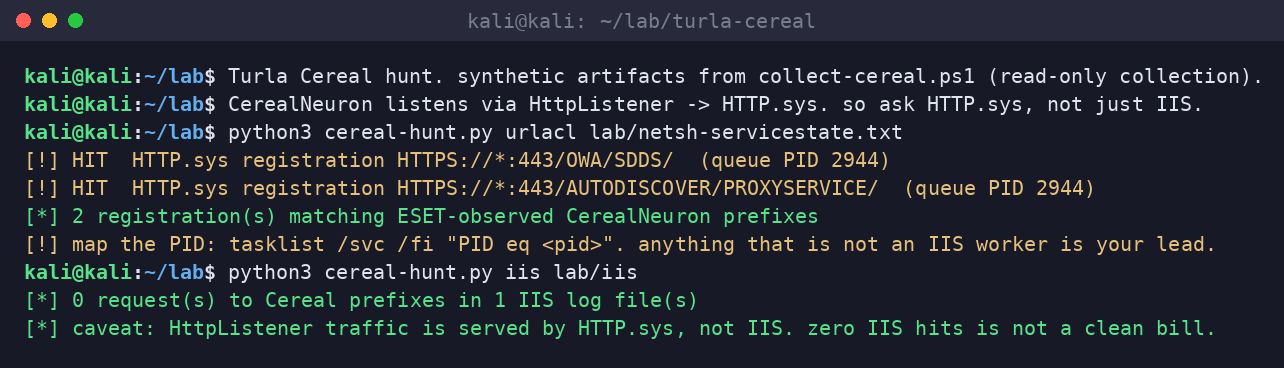
about that IIS result. when HTTP.sys routes a request to a non-IIS request queue, IIS never handles it, so you should not expect it in W3SVC logs. that is our reading of how HTTP.sys works, not something ESET tested and published, so verify on your own build. the kit still greps IIS logs for the prefixes because a misconfigured or stopped listener could make those requests fall through to IIS. zero IIS hits is not a clean bill of health. a hit is a gift.
also: we are deliberately not telling you to send test requests to those paths on a production server to “see what happens.” you would be poking a possible implant, possibly tipping off the operator, and generating exactly the noise that makes incident response harder. collect, do not probe.
step 2: hashes, and the names that should not be there
ESET publishes SHA-1 hashes for 18 Cereal files in its malware-ioc repository. the kit carries them all. the planted paths that matter most:
C:\Windows\System32\wbem\ncobjapi.dll, loaded by the WMI Provider HostC:\Windows\System32\wbem\wbemcomn.dll, a search-order hijack whereWmiPrvSE.exeloads it instead of the genuineC:\Windows\System32\wbemcomn.dll. ESET notes the malicious DLL forwards legitimate calls so WMI keeps working.- fake native images in
C:\Windows\assembly\NativeImages_v4.0.30319_64\, named after real Exchange assemblies such asMicrosoft.Exchange.Search.Mdb.ni.dll,Microsoft.Exchange.Data.Transport.ni.dll,EdgeTransport.ni.exeandMicrosoft.Exchange.EdgeSyncSvc.ni.exe. per ESET, the runtime loads the cached “native image,” the attacker’s entry point runs, and .NET then quietly falls back to the genuine library.
the kit’s hashes mode matches your SHA-1 export against ESET’s list and also flags ncobjapi.dll or wbemcomn.dll sitting in System32\wbem as REVIEW even when the hash is unknown, because ESET found the loader at those paths and the genuine copies live in System32.
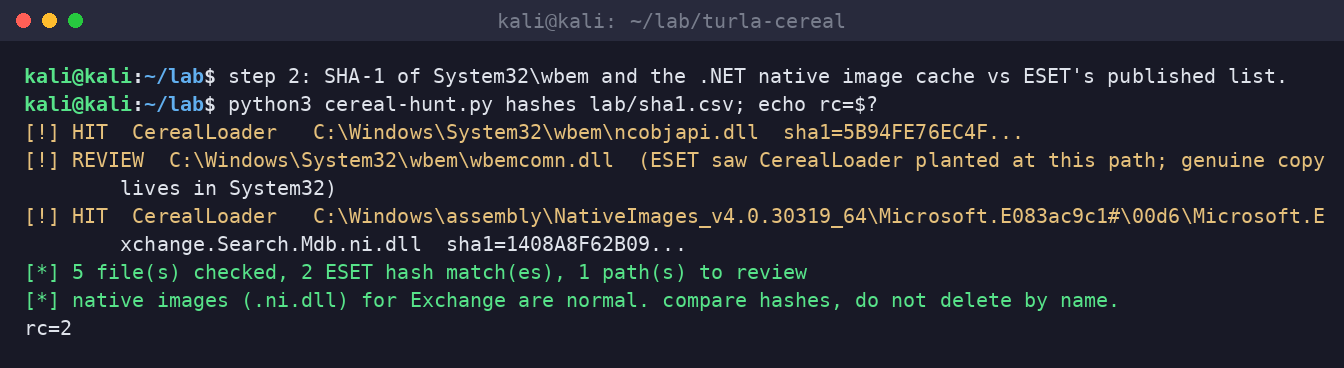
hash matching only catches the samples ESET saw. ESET itself notes that filenames and keys vary between samples, and everything except CerealLoader lives encrypted or in memory. treat a hash miss as “not these exact files,” then compare native images against a known-good Exchange server on the same cumulative update. a native image that no other server on that CU has is worth a look.
step 3: the transport agent list will lie to you, politely
Turla has abused Exchange transport agents before. so the obvious move is to run Get-TransportAgent and look for something new. ESET’s finding is that CerealBox does not add an agent. it wraps the handlers of agents already loaded inside EdgeTransport.exe. “No new agent appears anywhere in Exchange’s configuration.”
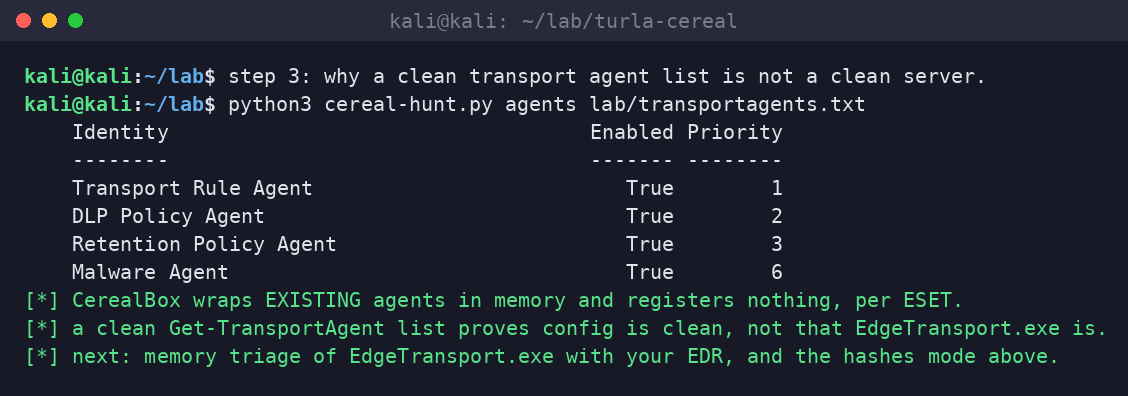
what does help, if your tooling supports it:
- memory triage of EdgeTransport.exe. look for .NET assemblies loaded from memory with no backing file. that is a job for your EDR or a proper memory capture, not a script from a blog.
- disk staging. ESET says interesting messages, those with .doc, .docx or .pdf attachments that match sender, recipient, subject or attachment-name lists, are serialized, gzip-compressed, XOR-encrypted, and written to a file on disk named in the configuration, which rolls to a new filename once the stash passes 5 MB. operators later read and delete those files with ordinary commands. look for opaque blobs that grow, vanish, and reappear on the Exchange server outside normal Exchange paths. (separately, ESET saw a helper component log encrypted errors to a file once named
FallbackLog.bin. cheap to search for, unlikely to be reused.) - WMI provider host behavior.
WmiPrvSE.exeloading a DLL fromSystem32\wbemthat is not signed by Microsoft is a high-value alert on any server, not just Exchange.
if you find it
- do not clean the box in place. isolate it and preserve memory first, because most of this toolset only exists in memory.
- assume mail theft. CerealBox copies messages out of the flow. work out which mail flowed through that server and when.
- assume credential theft. ESET lists LSA secret extraction among the commands. rotate service accounts and anything with credentials on that server.
- assume AD reconnaissance. ESET lists AD queries for computers, users, groups and DNS. your directory map is in Turla’s notes.
- rebuild the Exchange server from known-good media and bring it up on a current cumulative update.
- then go looking for the initial access, because ESET could not, and it is still out there.
the industry part
ten years of “move to the cloud” and the most sensitive mail at two national governments was still flowing through on-prem Exchange, on internet-facing servers, where a well-funded team could sit inside the transport process for months. this is not a criticism of those specific ministries. it is a description of half the planet.
also worth saying: the detection advice for this campaign is not “buy a new product.” it is “know which processes own which URLs on your own server, know your own file hashes, and be able to look at memory.” those were the basics in 2017 when Neuron was documented. they are still the basics. the attackers read the same reports we do and assume you did not.
download the Kali hunt kit
turla-cereal-exchange-hunt-kit.zip contains collect-cereal.ps1 (read-only collector for the Exchange server), cereal-hunt.py (urlacl, iis, hashes and agents modes, with ESET’s 18 SHA-1 hashes built in), a README, and the synthetic lab artifacts from the screenshots. no network activity, no malware, no exploit code. a clean run covers known indicators only.
sources
- ESET, “Exchange for breakfast: Turla’s Cereal tricks are not for kids” (Matías Porolli, November 10, 2026)
- ESET white paper, Turla Cereal tricks (November 2026), for HttpListener prefixes, loader paths, native image abuse and the IOC tables
- ESET, malware-ioc / turla README, Cereal section (SHA-1 hashes)
- UK NCSC, 2017 advisory on Turla’s Neuron and Nautilus (background on the Neuron comparison, as cited by ESET)