




Geolocate a Photo Like Bellingcat: EXIF, Reverse Image, Sun and Shadows
a photo is a sworn statement that does not know it is talking. it will tell you the camera, the time, sometimes the exact gps, and if the metadata is stripped it will still rat itself out through shadows, landmarks, and the position of the sun. this is the tradecraft investigators and journalists use to verify where and when a picture was really taken. it is also how you catch a “live” photo that is actually three years old.
step 0: get the easy win first (exif)
most people strip metadata by accident (social platforms do it on upload) but a shocking number of original files still carry everything. run exiftool before you do anything clever.
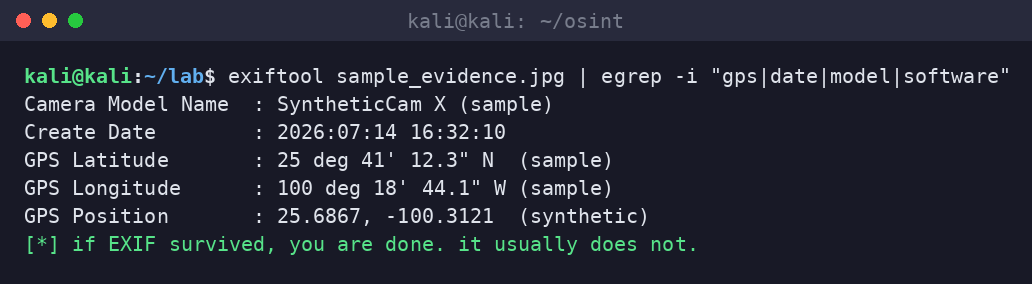
what matters: GPS Position (obviously), Create Date (the when), Camera Model and Software (links the photo to a device or an editing tool), and whether the timestamps are internally consistent. edited or screenshotted images often have give-away software tags or mismatched dates. an image straight off a phone with intact gps is a gift. do not expect gifts, but always check.
step 1: is this photo even original? (reverse image search)
before you spend an hour geolocating, make sure you are not geolocating a stock photo or a recycled image from 2019. reverse image search is the single highest-value step and the one people skip.
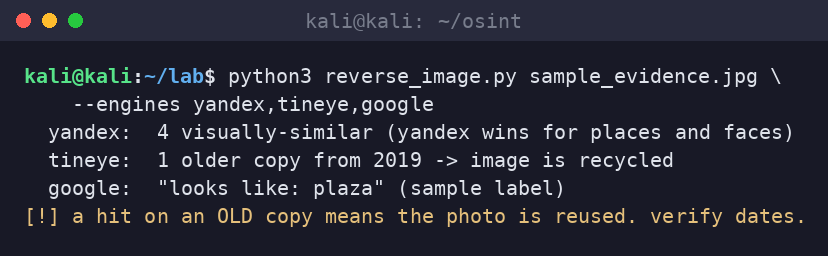
run it across engines because they are good at different things. yandex is famously strong on places and faces. tineye is best at finding the oldest known copy, which is how you prove an image is recycled (a scammer’s “proof of life” photo that first appeared in 2019 is not proof of anything). google lens is good for objects and generic labels. a hit on an older copy ends the investigation early and correctly.
step 2: no metadata? make the picture confess (chronolocation)
stripped exif is normal. that is where the real craft starts, and it is pure geometry plus patience. the sun is a clock and a compass. the length and direction of a shadow, combined with the timestamp, constrains your latitude. the azimuth (compass direction) of the shadow tells you which way the camera faced.
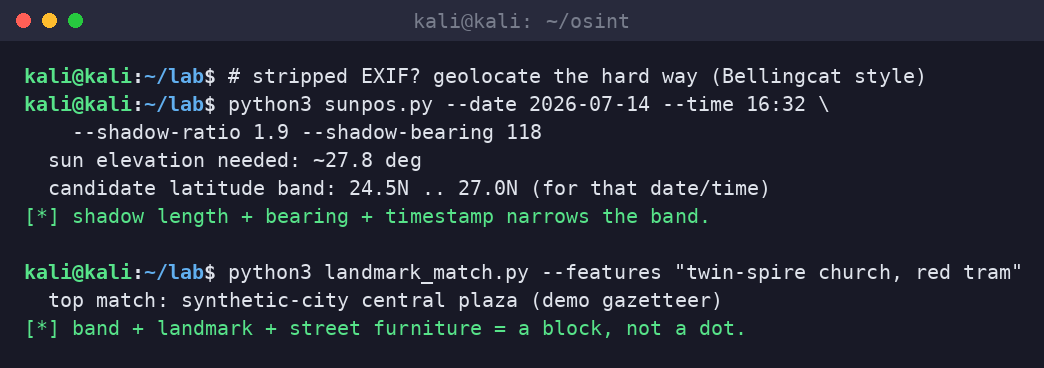
the bellingcat and sans workflow, in order: (1) identify fixed landmarks (a distinctive building, a bridge, mountains on the horizon) and search for them. (2) read the street furniture (signage language, license-plate format, traffic-light style, power-pole design, bollards) to fix the country or region. (3) use sun position (suncalc, or a sun-position script) with the timestamp to constrain latitude via shadow length, and direction via shadow azimuth. (4) cross-check against satellite and street-level imagery until a candidate location matches the roofline, the tree, the curb.
putting it together
- exiftool for the free answer and for timestamp sanity
- reverse image search (yandex, tineye, google) to kill recycled images early
- landmarks and street furniture to fix the region
- sun and shadow geometry to constrain latitude and camera bearing
- satellite and street-level imagery to confirm the exact spot
what defenders and investigators can do
- defenders / privacy: understand that your own posts leak this. strip exif, avoid posting real-time location shots, and know that “i cropped it” does not remove background landmarks.
- fraud / verification: use reverse image search to debunk fake “proof” photos in refund scams, romance scams, and bogus insurance claims. a recycled image is often the whole case.
- journalists: chronolocation turns “they claim this happened here on tuesday” into verified or debunked, with a reproducible method you can publish.
sloth take
the camera does not know how to lie, and the sun refuses to. exif gives you the lazy win, reverse image search saves you from geolocating a 2019 stock photo for an hour, and when the metadata is gone the shadows finish the job. aim it at claims and scams, not at people, and you are doing journalism. aim it at a stranger’s selfie and you are the problem.
sources
- Bellingcat guides to geolocation and chronolocation (bellingcat.com)
- SANS OSINT Summit talks on photo geolocation and verification
- ExifTool documentation (exiftool.org); SunCalc sun-position references
- Yandex, TinEye, and Google Lens reverse image search
- Lab artifacts generated on-box 2026-10-17 (synthetic sample image and terminal captures)